Admissions
Enquiry to enrolled, on one record.
Enquiry, tour, application, offer and enrolment, all on the record the student keeps for thirteen years.
Use it on its own beside your current system, or as part of Kestrel.
At a glance
Kestrel’s admissions module runs enquiry, tour, application, offer and enrolment on the same record the student keeps once enrolled.
One pipeline
Enquiry, tour, application, offer and enrolment, on the record the student then keeps.
Your own ladder
The rungs, what enters each and what reaching one does, set in your enrolment settings.
Acceptance in the portal
Answered by a parent with responsibility for the child, once each of two guardians has signed the application.
Conversion, as at a day
How many applications reached each rung, cut by source, campaign, intake or year level.
Show the detailHide the detail
Every family starts as one person record.
An enquiry from your website, the phone or the front desk creates the child and the adult once. Everything after it lands on the same record.
Tours and entrance assessments, booked to a capacity.
Your people schedule each session with its places, and families book from your website or the portal.
Your application form, built by your people.
Build and change your own forms. Each version is frozen once it’s published, so you always know what a family answered.
One board, your own ladder.
The board reads each application against your own ladder, narrowed by intake, year level and rung.
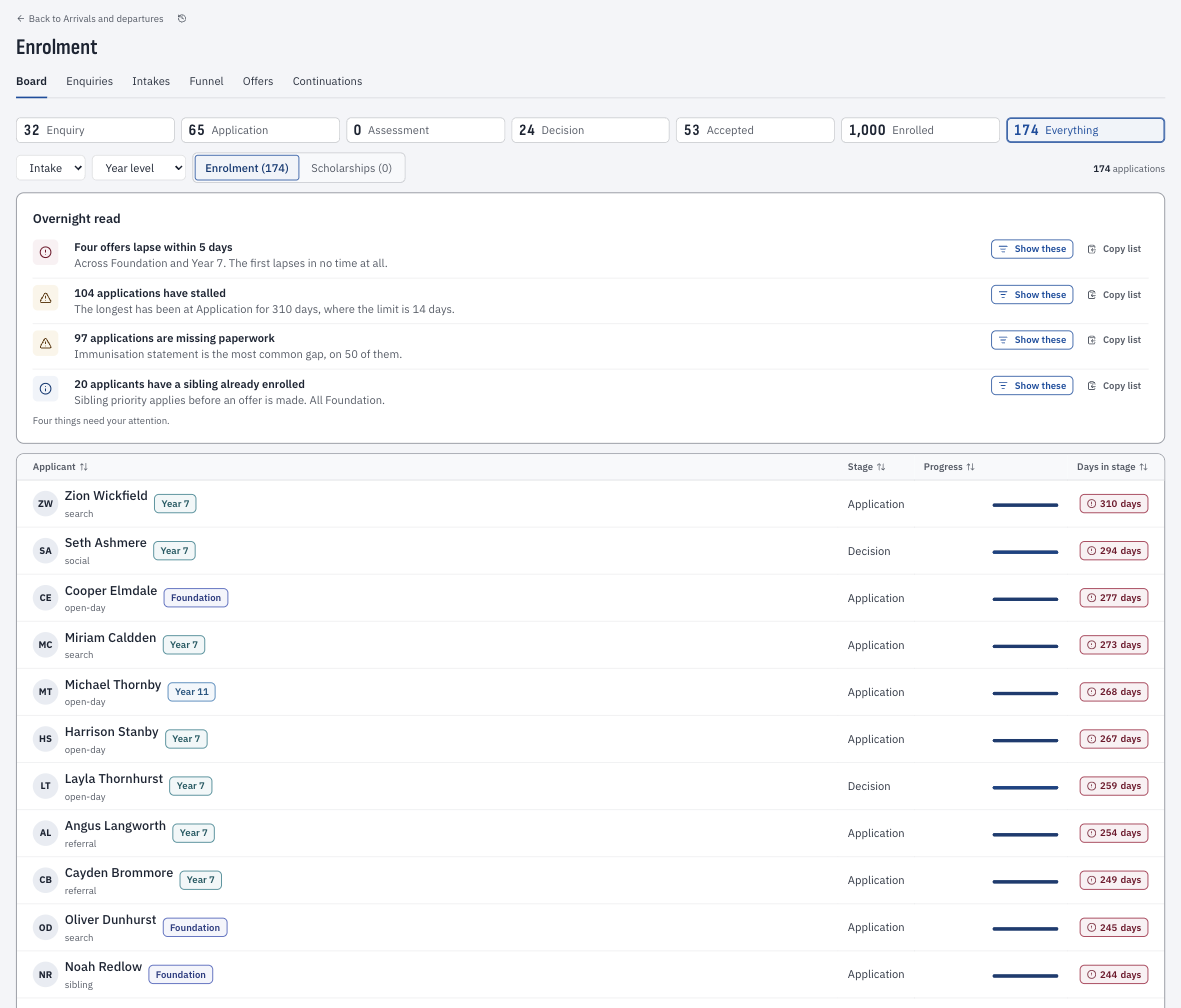
Offers with their terms, answered in the portal.
An offer carries its year level, start date, deposit and the day it lapses. A parent with responsibility for the child accepts or declines it in the portal.
A waitlist ranked by your own rules.
Each intake keeps its waitlist in the order your rules give.
Nothing is retyped.
The applicant record becomes the student record because it always was one.
Agents and CoEs, on the same record.
Name the education agent on an application, and keep each overseas student’s CoE work in one place.
Your people lodge each variation in PRISMS as they do today, and Kestrel keeps it on the record with the date it’s due.
What admissions creates.
Admissions is where the family model gets built: which parent receives reports, which grandparent may collect, who holds parental responsibility. Get it right at application and the next thirteen years are clean.
Admissions runs on the student record. A separated family with a court order is modelled from the first enquiry your people record, and stays modelled for thirteen years.
Bring your most particular admissions rule. We will show you it working.
Show us your ruleConversion, without asking anyone for a report.
It shows how many applications reached each rung and what share went on at each step, as at a day. You can cut it by source, campaign, intake or year level, with the applications behind any count.
Every change is on the record, with who made it.
Each step an application takes is kept with when it happened and who recorded it. Nothing is overwritten.
Start with admissions
Admissions works on its own, beside the system your school runs today.
Your school’s name, not ours.
Forms, emails and the family portal carry your brand, linked from your website.
New students go on to your current system.
When a family enrols, the registrar checks the student once and Kestrel sends them on, then confirms they arrived.
Siblings and current families are recognised.
A file from your current system lets Kestrel match the families you already know.
When you move to Kestrel, admissions comes with you.
Applicants, families and their history are already in place.
Questions schools ask
Is an applicant re-entered when they enrol?
Nothing is retyped. The applicant record becomes the student record on the start day.
How does a family accept an offer?
In the parent portal. Once each of two guardians has signed the application, a parent with responsibility for the child accepts or declines the offer.
Can we see conversion by source?
Yes. The funnel shows how many applications reached each rung, as at a day, cut by source, campaign, intake or year level.
Can we use admissions without changing our student information system?
Yes. Admissions runs on its own, and each new student is sent to your current system when they enrol.
Do families see Kestrel’s name?
Families see your school’s name in the portal and on your forms.
Can our website take enquiries and tour bookings?
Yes. Your web team sends enquiries and tour bookings to Kestrel, and each lands on the register as one person record.
Can we rank our waitlist our own way?
Yes. You set the order: siblings, old scholars’ children, your people’s children, an answer on the form, then the date received.
Do you handle international students?
Yes. You name the education agent on each application, the agent sees only their own applications, and the CoE variations and welfare arrangements are kept on the record. Your people lodge in PRISMS as they do today.
What if we make a mistake on an application?
Correct it. The wrong entry stays on the record, marked with the reason, so the history is always whole.
How do you handle a family with a court order?
Your people record the order on the child, and only those cleared for restricted facts see it.
What happens when we move to Kestrel later?
Admissions is already part of it. Applicants and families are already in place, and only the rest of the record comes across.
How is admissions priced on its own?
It’s quoted for your size of school, and it’s included in Kestrel, so you don’t pay for both.
Bring your registrar.
Start with the eight-minute film. Then, if you’d like, forty minutes with us on your enrolment policy and your admissions ladder. Admissions can start on its own. Migration is included when you move, within your implementation project, and pricing is quoted for your size of school.