The portals
The record, turned around.
A parent portal is usually a second application holding a copy of your families, which then has to be kept in step with the first. Kestrel’s is the same record read from the other side, so there is no copy and nothing to reconcile.
At a glance
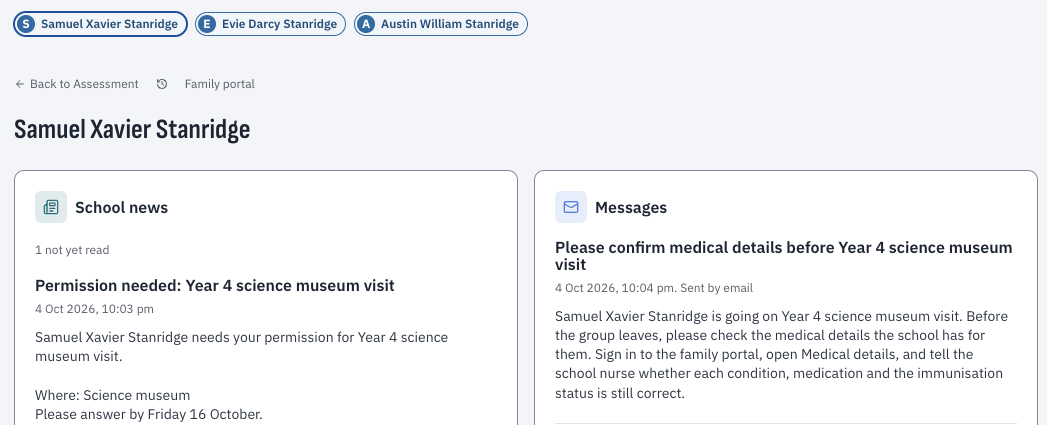
Kestrel’s family and student portals show each family the record at the standing they hold on their child, with student sections switched on by the school.
Sections from the source
Each section is supplied by the part of Kestrel that owns what it shows.
What families read
Attendance, reports, results, co-curricular, consents, applications, the calendar and notices.
A student view of its own
Released results, subject selection and requests, switched on by the school.
Each family at its own ceiling
A parenting order that limits one parent limits what the portal shows them too.
Questions schools ask
What can parents see in the portal?
Attendance, reports, results, co-curricular, consents, applications, the calendar, and news and notices.
Do parenting orders apply in the portal?
Yes. Portal reads run under the same authorisation as everything else, so an order that limits what one parent may receive limits it here too.
Can students use the portal?
Yes, once the school switches their sections on: released results, subject selection and requests to the school.
Show the detailHide the detail
Each section belongs to whoever owns the data.
The portal is the record, turned around. Each section is registered by the part of Kestrel that owns what it shows: attendance contributes the attendance section, assessment the reports, activities the fixtures. Each section always matches the screen it mirrors.
Each student section is off until your school switches it on, and each family section follows the standing a parent holds on the child, with any the school does not want switched off.
What a family reads.
What a student reads.
A student is a different audience. They read their own released results once the school switches that section on. They rank subjects in an open selection round and read them back as sent. They send a request to the school and read its decision. They read the school’s news after agreeing to the policy that governs it.
The separation is enforced by the system. When the office adds a link for families, a parent sees it and a student does not. The audience is a property of the thing, so no-one has to remember which portal they were configuring.
Where a selection breaks one of the school’s rules, the student is shown the school’s own sentence explaining why, and nothing is saved. A set of preferences is saved whole or not at all.
A family reads at a family’s ceiling.
Portal reads run under the same authorisation as everything else, at the standing that family holds on that child. A parenting order that limits what one parent may receive limits it here too, because it is the same record answering.
How protection extends across the record · Who may answer a consent
Built for a phone.
Families read this on a phone in a car park, so the portal is exercised at phone width.
Those empty states are where a portal usually embarrasses a school in its first term.
Bring a separated family.
Start with the eight-minute film. Then, if you’d like, forty minutes with us on your orders and your portal policy.