Moving to your vendor’s new web version is a decision, not just an upgrade
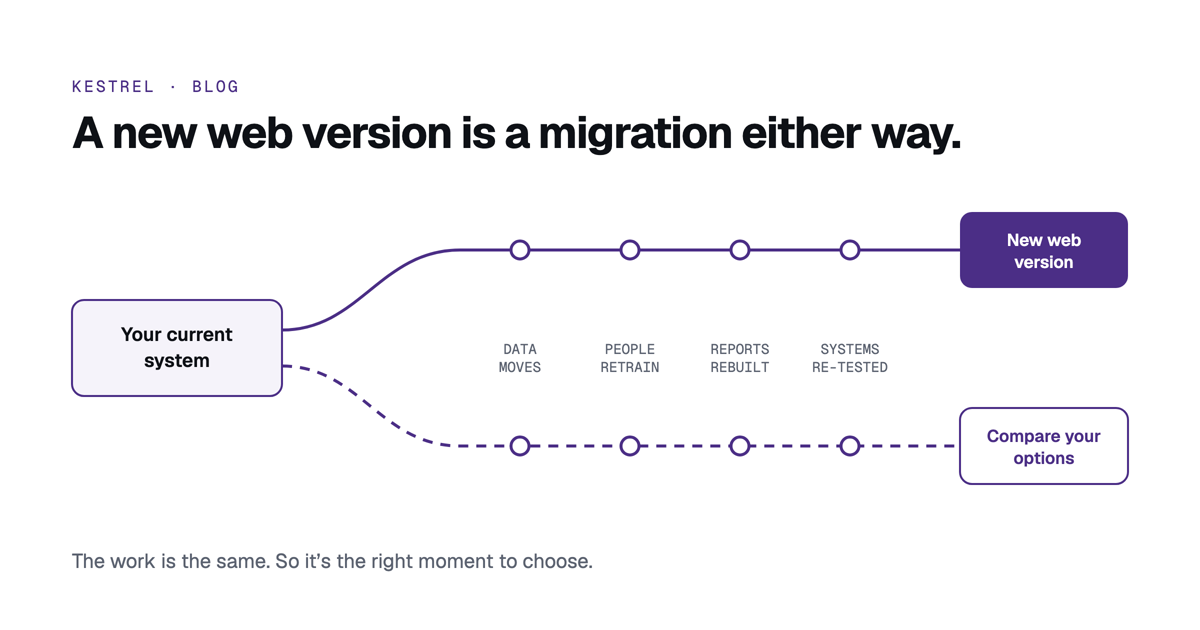
It is a migration either way. That makes it the right moment to look at what else is available.
Many schools have used the same student information system for ten years or more. It holds their history and the reports run the way they always have. People know it well, but it does have its challenges, and the school has learned to work around them.
Now your vendor has a new web version to bring your systems up to date. It can feel like the natural next step: the same name, the same relationship, and an upgrade path laid out for you.
It is worth treating that step as a decision rather than a default. Staying with your vendor may well be the right answer. The point is to reach it by comparing, because the work involved is much the same whichever way you go.
A new web version is a migration
Moving to a new web version usually means much of what a move to a different system means:
- The data moves. Records are converted into a new structure, then checked by the people who know them.
- People retrain. New screens and new workflows, for everyone from the front office to the classroom.
- Processes are set up again. Rolls, reports, consent rounds, census preparation and permissions are each configured afresh.
- Reports are rebuilt. Custom reports and exports seldom carry across unchanged.
- Integrations are re-tested. The learning platform, timetabling, finance, identity and every other system connected to the old version.
- The project needs time and attention from the registrar, the business manager and IT, often over more than one term.
None of this is a reason not to upgrade. It is a reason to see the upgrade for what it is: a project of about the same size as a change, and a good moment to make sure you are choosing the best place to land.
Parity is a starting point, not the goal
A new web version is often rebuilt in stages, and the first question most schools ask is about parity: does it do everything the old one did?
That question matters. Ask which of the features you rely on are in the new version today, which are planned, and when. Check the ones that are easy to forget: the report the board sees each term, the export the finance team depends on, the permissions around wellbeing and medical notes.
But parity only measures the new version against the old one. It keeps what works, and it can also keep the workarounds your people have learned: the spreadsheet beside the system, the detail re-keyed in a second place, the call to the office to check. The better measure is fit with where your school is heading. What should the student record hold, which specialist systems should connect to it, how should people sign in, and where should the data live? Judge every option against that target, as well as against the system you have now.
What to weigh
What actually moves across. Ask what converts automatically, what is rebuilt by hand, and what is left behind. History matters to schools: past enrolments, wellbeing notes, medical records, alumni.
Whether the data model changes. A new interface on the same structure is a different proposition from a new structure. Families, separated parents, people who hold more than one role, and multi-campus schools are good tests.
What the new version includes, and what it costs. Compare modules, sign-in and security features, hosting, support and training. Look at the total over five years, not just the first.
How long the current version is supported. It sets your timeline, and it tells you how much room you have to compare properly.
What you would gain. List the three things your people most want to be easier, such as answering a new question from the board, running an excursion consent round, or preparing the census. Then see how each option handles them on real screens.
How the move would run. Who checks the converted data, how many rehearsals there are, whether it can be rolled back, and whether the cutover date suits your calendar.
Questions to ask every option, including your current vendor
- Can we see our own scenarios on real screens, rather than slides?
- How does it fit our target architecture: what it holds, which of our systems connect to it, and how?
- What converts from our current data, and who signs it off?
- Can we rehearse the move, and how many times?
- Where is our data hosted, and who can see it?
- What is included, and what is extra?
- If we left in five years, how would we get our data out?
The answers make the comparison fair. They also make the choice easy to explain to your principal and your board, whichever way it goes.
A good time to compare
A renewal, a new web version, or the end of support for an old one gives a school a natural window. The work of moving is coming either way. Spending a few weeks comparing your options at the start is a small part of that effort, and it means the system you land on is the one you chose.
If it helps to start with a structured view of where your current system stands, the free SIS Health Check takes about five minutes and gives you a report to share.
How Kestrel approaches a move
Kestrel includes migration. Each import is rehearsed as often as you need and checked by your own people against your current system, and nothing is committed until you sign it off. The final run lands on the date you choose, planned around your reports and census days. How a move to Kestrel runs.